Card Centering App — Free Mobile & Desktop Browser Tool
Use a fast card centering calculator app right in Safari or Chrome—snap a photo, auto-straighten perspective tilt, and align borders under an 8× touch loupe with zero install.
Drop a photo of one card here
Lay it on a contrasting surface, with the whole card in frame. Runs 100% locally.
Centering · Front
Waiting for photoSlab grade ceiling
Centering sets the ceiling; corners, edges and surface decide the final slab.
Grade or skip · ROI calculator
Expected net gain vs. selling raw. Expected to beat selling raw after fees.
- Sell raw now (net)
- $39.04
- Grade & sell (expected)
- $67.77
- Break-even PSA 10 price
- $146.39
- Max raw price to grade
- $78.12
PSA fees checked 2026-11-12. Estimate only, not financial advice.
Batch Submission Queue (0/50)
Auto-ranked by EVQueue up to 50 cards and export a PSA packing slip (CSV or PDF) ranked highest profit first.
Real card centering examples
How outer cyan edges and inner pink frames translate into PSA, BGS & CGC limits.
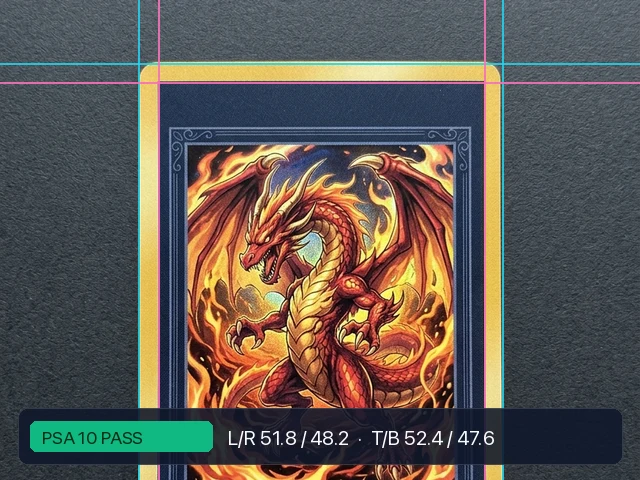
PSA 10 Gem Mint Pass (51.8 / 48.2)
Balanced yellow borders comfortably inside PSA 10 (55/45) and CGC Gem Mint 10 tolerances.
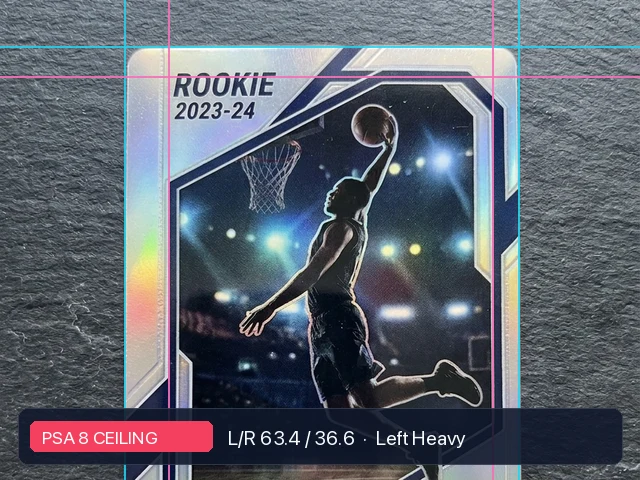
Off-Center Rookie Cap (63.4 / 36.6)
Heavy left silver border misses 60/40 PSA 9 cutoff — saves you a $40+ wasted grading fee.
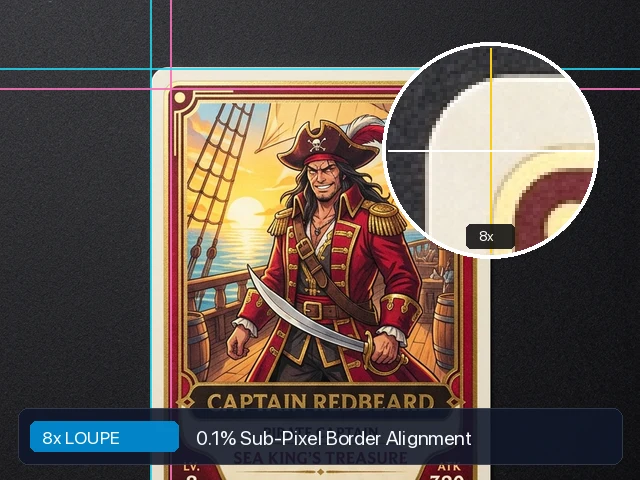
8× Touch Loupe Precision
Finger-dodging 8× corner crosshair makes aligning thin borders effortless on phones.
How to measure card centering online
- 01
Snap or drop a photo
Place the raw card on a contrasting desk surface. Front and back are measured separately.
- 02
Straighten & align with 8× loupe
Four corner pins remove camera tilt. Drag cyan outer and pink inner lines with 0.1% precision.
- 03
Check slab ceiling & ROI
See PSA, BGS & CGC grade ceilings instantly, then compare expected graded value vs. selling raw.
Most native phone apps lock border overlays behind subscriptions or force you to hold the card perfectly flat. This browser-based card centering app runs 100% locally on your device, straightens angled desk photos with four corner pins, and pops up an 8× corner loupe that dodges your finger so you can measure Pokémon, sports, and One Piece cards anywhere.
Official centering standards (PSA, BGS & CGC)
| Grade | PSA Front | PSA Back | BGS Front | BGS Back | CGC Front | CGC Back |
|---|---|---|---|---|---|---|
| 10 | 55/45 | 75/25 | 50/50 both ways | 60/40 | 50/50 for Pristine; 55/45 still Gem Mint | 75/25 |
| 9.5 | no 9.5 grade | no 9.5 grade | 50/50 one way, 55/45 the other | 60/40 | no centering number (Mint+ is eye appeal) | no centering number |
| 9 | 60/40 | 90/10 | 55/45 both ways | 70/30 | 60/40 | 90/10 |
| 8 | 65/35 | same 90/10 as a 9 | 60/40 | 80/20 | 65/35 | wider than the last row |
| 7 | 70/30 | same 90/10 as a 9 | 65/35 | 90/10 | 70/30 | wider than the last row |
| 6 | 80/20 | wider than the last row | 70/30 | 95/5 | 75/25 | wider than the last row |
| 5 | 85/15 | wider than the last row | 75/25 | 95/5 | wider than the last row | wider than the last row |
These are centering limits only. Corners, edges, surface and eye appeal can all lower the final grade, and every company calls its limits approximate. PSA, BGS and CGC figures follow their published grading scales (BGS Pristine 10 requires 50/50 front and 60/40 or better back).
Frequently asked questions
Do I need to install an iOS or Android card centering app? +
No. This card centering calculator app runs directly in mobile Safari, Chrome, and desktop browsers with no App Store download, no sign-up, and no photo uploads.
How does the 8x touch loupe help on a phone screen? +
On touchscreens your fingertip normally covers the border edge you are trying to align. When you drag any guide line, an 8× magnified crosshair opens in the opposite corner of the canvas so you see every pixel clearly.
How do you calculate card centering percentages? +
Measure the left border and the right border, then divide each by the sum of the two. Do the same for top and bottom. A left border of 2.6 mm and a right border of 2.4 mm is 52/48 left to right. This tool does that from the guide lines, to 0.1%.
Does the photo leave my browser? +
No. The image is read, straightened and measured on your device. Nothing is uploaded, and there is no account.